
Resources & Networks: Star Trek Outposts Unknown
Find resource sources in Star Trek: Outposts Unknown, trace production inputs and check physical power, water and computing connections for your outpost.
Find the exact resource, not a similar icon
This Guide covers Star Trek: Outposts Unknown on Windows, launch release checked on 21 October 2026. Numeric build details were not specified in the reviewed launch announcement. Follow the current in-game requirements when they differ from an older promotional capture.
Prerequisite: complete enough of the opening Outpost tutorial to see the resource tracker. Later resource producers and network categories depend on your progression; this is not a claim that every listed option is available immediately.
- Select the building, investigation or production job that needs supplies. Write down the exact resource name and required amount shown there.
- Expand the outpost resource tracker in the upper-right. Find the matching resource icon rather than using the total for a related material.
- Hover that icon and read its sources. The tooltip identifies where the resource is found or produced. Use that list to decide which producer, gathering task or resupply option to inspect.
- Select the relevant producer. Check its own material inputs, crew eligibility and operating requirements. If one input is short, repeat the tooltip check for that upstream input before adding another identical building.
- Check the current delivery or work task. If the required resource is available but the intended order still waits, inspect construction and Crew Tasks priority. A stock count alone does not explain who is doing the work next.
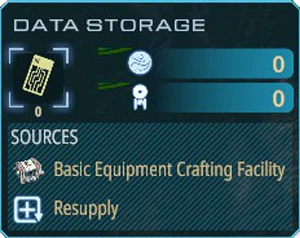
Trace the chain one dependency at a time
The resource loop includes harvesting, refining, combining, transporting and consuming materials. When a downstream item is missing, start with the missing named dependency rather than assuming that more basic raw stock is enough.
| Your next decision | Information to read | Action |
|---|---|---|
| Where can I get this item? | The exact icon’s Sources tooltip | Inspect a listed source that your current outpost can use |
| Why is its producer inactive? | Producer’s input and operating information | Supply the missing input, eligible staff or required utility |
| Why is the job still waiting? | Current and queued Crew Tasks | Prioritize the needed job and review competing assignments |
| Why can I not build that producer yet? | Operations Center and current objective | Advance the required unlock rather than queueing a different item |
The tooltip is a navigation aid, not a guarantee that a listed resupply is currently on its way. Read the live game state. This Guide does not invent shipment schedules, extraction rates or a universal recipe table.
Connect an operating building
Power, water and computing are delivered through physical conduits. Their infrastructure occupies outpost space. A finished building with supplies can still need one of those connections before it can perform its job.
- Open the completed building’s information tabs and identify which utilities it actually requires.
- Locate the corresponding supply infrastructure you have unlocked. Plan a physical route to the building; leave room when placing later structures.
- Inspect the building again after connecting it. Check its displayed utility, crew and input state together before treating the remaining problem as insufficient raw materials.
- If it remains inactive, follow the requirement it still shows. Do not add water or computing to every structure automatically: building requirements differ.
The launch-preparation changes made most network infrastructure free and instant. That wording does not cover every network object or remove a facility’s other requirements. Use the live placement cost and connection display for the specific infrastructure.
Materials and research points are different stages
Finding a research sample is not the same as already having a spendable technology point. Laboratories process appropriate samples into research points, which are then spent in the tech tree. If an upgrade is short on points, check the relevant lab and its inputs rather than counting every resource in storage as research currency.
Likewise, a tech improvement and an Operations Center building-category unlock serve different purposes. Read the actual prerequisite shown for the next structure or upgrade; no single research order is mandatory for every map.
Before committing more crew
When a point of interest asks for supplies, read that investigation’s requirement before assigning your best officers. A general stockpile total does not prove it has the right inputs. Check the task and crew state if they wait rather than assuming that time alone will solve it.
Return to the construction queue decision table for a finished resource chain but stalled building order. The Guide index explains which page to use first. About the editors describes the launch scope and correction process; these are independently written reference Guides, not a claim of hands-on testing.
Related Articles
Was this helpful?
Thanks for the feedback!